
|

Creating SQL Results Sets with Aggregate and Detail Data
By Craig S. Mullins
Every SQL manipulation statement operates on a table and results in another
table. All operations native to SQL, therefore, are performed at a set level.
One retrieval statement can return multiple rows; one modification statement
can modify multiple rows. This feature of relational databases is called relational
closure. Relational closure is the major reason that relational databases
such as SQL Server generally are easier to maintain and query than other types
of databases.
Additionally, SQL specifies what data to retrieve or manipulate, but does
not specify how to accomplish these tasks. This keeps SQL intrinsically
simplistic.
If you can remember the set-at-a-time orientation of SQL Server, and that
your queries specify "what" to retrieve and not "how" to
retrieve it, then you grasp the essence and nature of SQL. The capability to
act on a set of data coupled with the lack of need for establishing how
to retrieve and manipulate data defines SQL as a non-procedural language.
SQL Server also provides a series of functions that can be used to
aggregate data. Certain column functions can be used to compute, from a
group of rows, a single value for a designated column or expression. For
example, the sum function can be used to add values in multiple rows,
returning the sum of the values instead of each individual value.
Details and Aggregates
Now, taking the previous discussion into consideration, what if you need to
return detail data and aggregated data in the same results set using SQL. For
example, consider the sample pubs database that comes with
Microsoft SQL Server. The sales table contains information about each title
sold (refer to Figure 1 for a sample of the data contained in the sales
table).

Figure 1. Sample sales table data.
To return a simple list of the detail information contained in this table
you could issue the following query:
select stor_id, ord_num, ord_date, qty,
payterms, title_id
from sales
But what if, instead of just returning qty on each row, you also wished to
return the average quantity, maximum quantity, and minimum quantity. This is
not quite so easy. You can use the avg, max, and min
functions to return the average, maximum, and minimum qty of a sale by store
as follows:
select stor_id, avg(qty), max(qty), min(qty)
from sales
group by stor_id
This query returns a single row for each store containing the average,
maximum, and minimum sale. It does not contain any detail information, only
aggregated information.
However, there are times when it is desirable for a single query to return
both detail and aggregate information. For example, what if you wished to
compare each sale qty to the average sale qty? There are several ways to do
this, but it is desirable to be able return both values in a single query to
simplify your application.
One solution is to create a view. Consider the following view named
sales_qty created on the sales table, as shown here:
use pubs
create view sales_qty
(stor_id,
max_qty, min_qty, avg_qty)
as select stor_id, avg(qty), max(qty), min(qty)
from sales
group by stor_id
After the view is created, you can issue the following select
statement joining the view to the base table, thereby providing both detail
and aggregate information on each report row:
select s.stor_id, s.title_id, s.qty,
q.max_qty, q.min_qty, q.avg_qty
from sales s,
sales_qty q
where s.stor_id = q.stor_id
order by 1
This query returns one row for each sale, listing both the store identifier
and title identifier, along with the actual quantity, and the maximum,
minimum, and average quantity for that store. The data will be returned in
stor_id order. This can be changed simply by changing the order by
clause to specify which column the results should be sorted by.
Additionally, it is important to remember the meaning of the aggregates
returned by the view. The aggregated data is by store, and not by title.
Neither does the aggregated data represent the average, minimum, and maximum
of all sales (independent of store). This is because that is the way the view
was created. Do not forget the definition of the view. View definitions can be
retrieved from the SQL Server system catalog tables using the sp_helptext stored
procedure as follows:
  use pubs
  exec sp_helptext 'sales_qty'
This will return the actual SQL DDL that was used to create the view.
If additional information, such as the publication title is required, you
can add the title table to the join as follows:
select s.stor_id, s.title_id, t.title, s.qty,
q.max_qty, q.min_qty, q.avg_qty
from sales s,
sales_qty q,
titles t
where s.stor_id = q.stor_id
and s.title_id = t.title_id
order by 1
Indeed, once the view is created, you can use it in any way allowable by
SQL Server. Using views in this manner you can create any number of detail and
aggregate combination reports that your organization may desire.
Other Approaches
Of course, this is only one example of how to return detail and aggregate
data in a single row. You could also use a temporary table. A temporary table
is created by prefacing the table name (in the create statement) with a number
sign (#). Temporary tables are stored in the temporary database, tempdb.
The tempdb database is used to hold all temporary tables and any other
temporary storage needs. It is a global resource; the temporary tables and
stored procedures for all users connected to the system are stored there. SQL
Server re-creates tempdb every time it is started. This clears out data
so the system starts with a clean copy of tempdb. Since tempdb
is be definition, temporary, this is not a problem.
So, you could create a table in tempdb as follows:
  use pubs
  create table #sales_qty
(
stor_id char(4),
max_qty smallint,
min_qty smallint,
avg_qty smallint
)
Then you would have to populate the table with data using a bulk insert,
for example:
insert into #sales_qty
(select stor_id, avg(qty), max(qty), min(qty)
from
sales
group by stor_id)
Then you can run the query to retrieve the detail information from sales
and the aggregate information from the temporary table as follows:
select s.stor_id, s.title_id, s.qty,
q.max_qty, q.min_qty, q.avg_qty
from sales s,
#sales_qty q
where s.stor_id = q.stor_id
order by 1
Views, however, are easier to implement than this method. The advantage of
a view over a temporary table is that the view does not require storage. Once
created, it is always in sync with the base table(s) that it is defined on.
The temporary table will consume storage, but only temporarily. Temporary
tables are automatically dropped on disconnect. So even though you will need
to create the temporary table only once, you will need to populate it with the
aggregated data every time you run a query that needs the information.
Furthermore, when tempdb is used you will need to concern yourself with the
possibility that the data you need to store in temporary tables exceeds the
amount currently allocated to tempdb. For these reasons, views are preferred
over temporary tables.
Another method, in this case preferable to the view implementation, is to
use in-line views. SQL Server supports the capability to code a select
statement in the from clause of another select statement. This is often
referred to as an in-line view because the SQL statement is placed in-line in
the from clause of another SQL select statement. So, you can use
an in-line view to embed the aggregate query into the detail query as follows:
select s.stor_id, s.title_id, s.qty,
q.max_qty, q.min_qty, q.avg_qty
from sales s,
(select stor_id, avg(qty), max(qty), min(qty)
from sales
group by stor_id) as q
(stor_id, avg_qty, max_qty, min_qty)
where s.stor_id = q.stor_id
order by 1
This returns the same results as the other methods. Refer to Figure 2 for
an example of the results of this query.
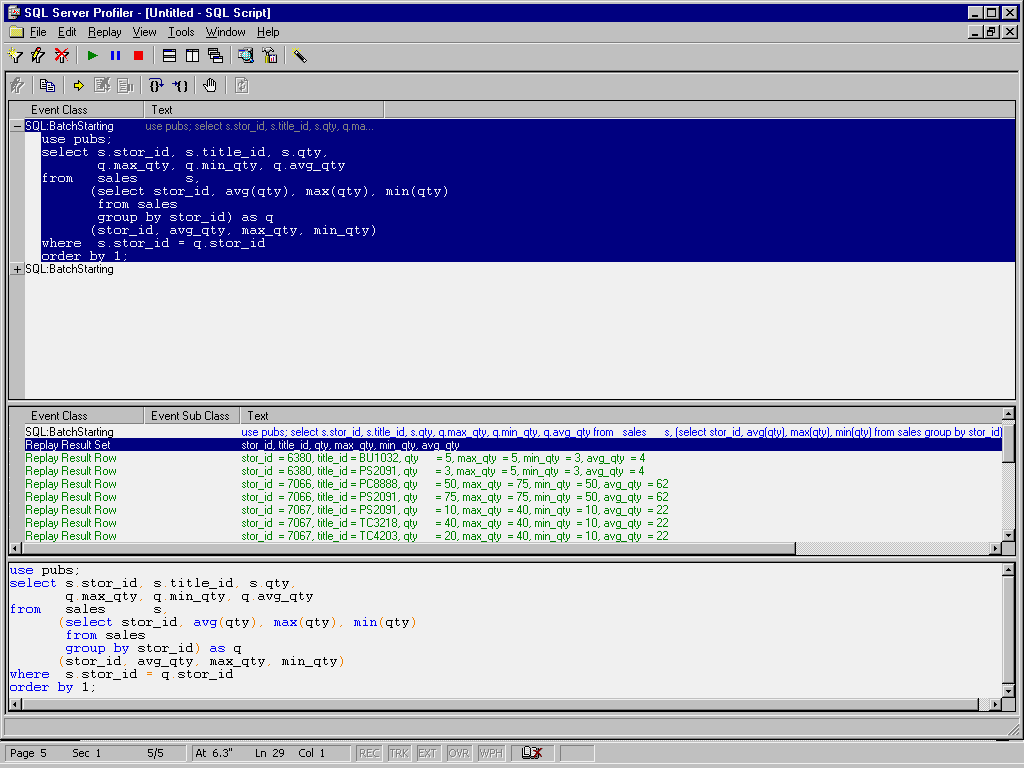
Figure 2. Using an in-line view.
This approach is the most complicated because it combines everything into a
single query. However, it is also the easiest to implement once you understand
the process.
Synopsis
This article has discussed three different ways to combine detail and
aggregate information on a single line in a result set from a SQL Server
query. Of the three, the view method is probably the easiest to understand.
However, the last one, the in-line view method, is the one with the least
administrative overhead because not additional SQL Server objects need to be
created. Only the middle method, using temporary tables, is not recommended in
practice because of the programming and administrative overhead required to
implement.
From SQL Server Update
(Xephon) April 2000.
© 2000 Craig S. Mullins, All rights reserved.
Home.
|
 Craig S. Mullins